Extension
The VluxySF library also comes with a companion Extension and Plugin. Using it is completly optional.
Instructions
Install the Extension in VS-Code and install the Plugin in Roblox.
Make sure your ports match in the extension and plugin; by default its 7842.
Once done just click on the VluxySF icon in the plugins tab and you should hear a connect sound. If it stays connected then you should be ready to bake your types.
How It Works
What this companion software will do is bake types for you. More specifically it will make a unioned string literal of all your sound names under the SOUNDS Configuration.
It is highly recommend that you use Luau-LSP for your Language Server Provider.
If you do end up using Luau-LSP then make sure Enable Fragment AutoComplete is off. At the moment(2/28/2026) it causes inline suggests to not auto popup most the time.
Example of the extension in use:
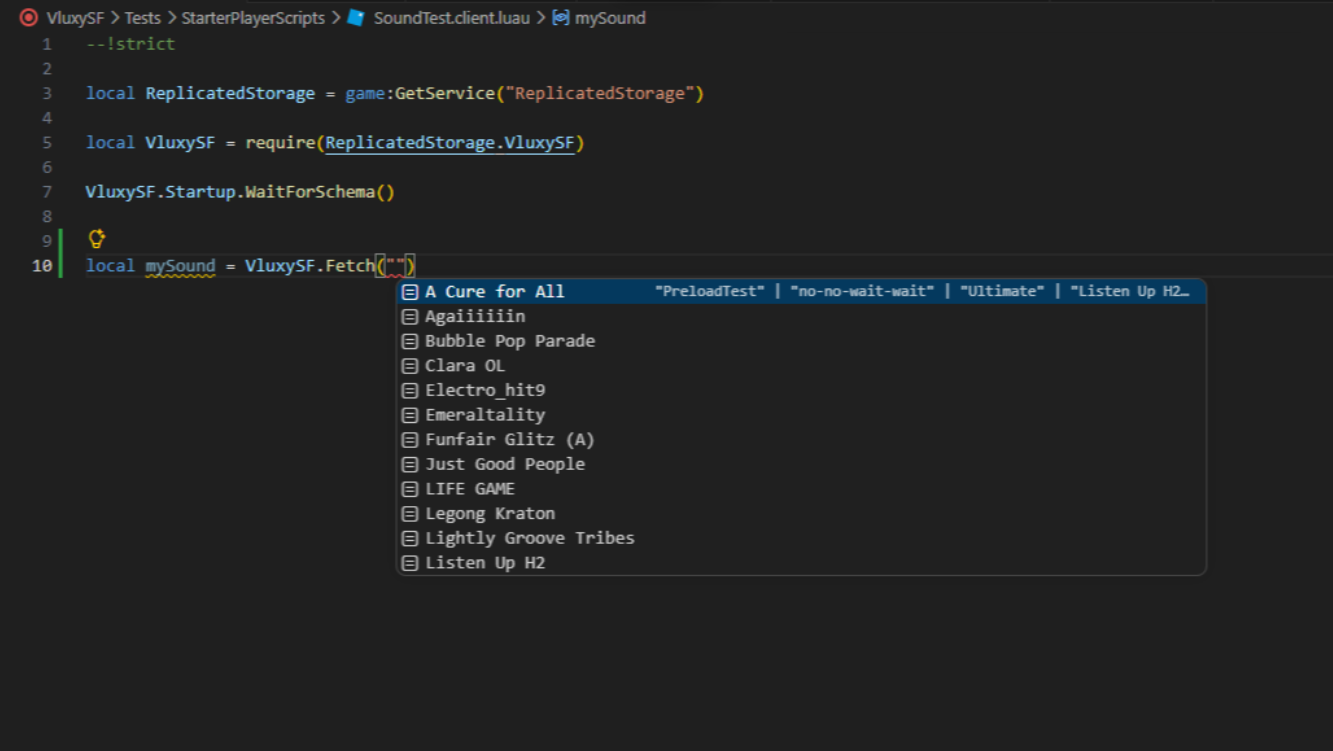
Note: This extension has a
limit of 800 soundsfor type baking!
Example of what the type will look like internally by default:
--!strict

export type BakedTypes = string

return nil
Example of what the type will look like internally once baked:
--!strict

export type BakedTypes = "A Cure for All" | "Agaiiiiiin" | "Bubble Pop Parade" | "Clara OL" | ...

return nil
Example of what the type will look like internally once baked if LooseTypes is on in the Extension:
--!strict

export type BakedTypes = string | "A Cure for All" | "Agaiiiiiin" | "Bubble Pop Parade" | "Clara OL" | ...

return nil